 eStreamly
Chapter 01Mastering Instagram Livestream: The Ultimate Guide to Enhanced Broadcasting
In a digital era ruled by visual storytelling, Instagram livestream has emerged as a vital tool for individuals and brands to engage audiences in real time. Instagram’s massive reach and evolving features make it the premier platform for impactful live content. While Instagram offers native livestreaming, many content creators, businesses, and retailers want to take broadcasts to the next level—unlocking advanced features, customization, and a polished, professional look.about.instagram
This optimized guide breaks down how to harness the full power of Instagram livestream using third-party streaming software, allowing for a richer, more dynamic live experience. Whether the goal is to grow a brand, showcase products, or create interactive content, these advanced tools make it all possible.
Chapter 02Why Upgrade Your Instagram Livestream?
Instagram livestream builds authentic connections with viewers, boosts brand visibility, and drives real-time engagement. However, using only the built-in phone camera limits creative options. By integrating third-party broadcast software, livestreams can feature multiple cameras, professional audio, graphics, guest appearances, and immersive overlays—features that help content stand out.
Chapter 03Introducing Instagram Live Producer
Instagram Live Producer: available exclusively on instagram.com enables creators to go live from a desktop with software like OBS Studio, Ecamm, Streamlabs, or eStreamly. This breaks free from mobile-only constraints, delivering studio-level livestreams for any audience.
Chapter 04How To Check Access
Not all Instagram accounts have access to Live Producer. To check:
- Log into Instagram from your desktop.
- Click “Create.”
- If “Live Video” appears, you can use Live Producer.
Chapter 05Why Use Instagram Live Producer?
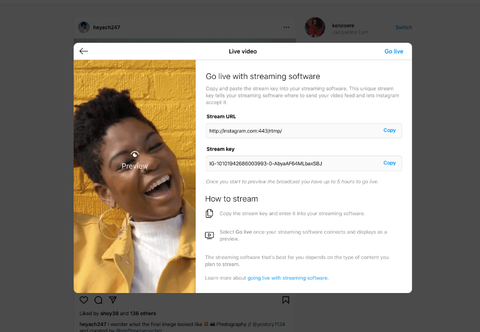
With a unique stream key and URL, you gain access to:
- Multi-camera setups and external microphones.
- Custom graphics and overlays.
- Pro-level control over video and audio quality.
- Visually compelling, branded, multi-dimensional livestreams that captivate viewers. Watch a how to guide here with Primal Video: primalvideo
Chapter 06Instagram Livestream Technical Requirements
- Video format: Vertical (recommended 9:16 aspect ratio).
- Resolution: 720×1280 (720p).
- Frame rate: 30fps (supports up to 60fps).
- Bitrate: 2,250–6,000 Kbps. Get a full break down here videosdk
Chapter 07Step-by-Step: Set Up Instagram Livestream with Live Producer
- Visit instagram.com and click the “+” (Add post), then select “Live.”
- Create a catchy title and select your audience (“Practice” is private; “Public” reaches all followers).
- Instagram will provide a stream URL and unique stream key.
- Open your preferred streaming software (e.g., OBS Studio, Ecamm, Streamlabs, eStreamly).
- Enter your unique stream URL and stream key in the software’s streaming settings.
- Start your livestream in your software, then, on instagram.com’s Live Producer viewer, click “Go live” to begin your broadcast.
- Once you’re finished, hit “End live video” within Live Producer to stop streaming.
Chapter 08Alternatives to Instagram Live Producer
If Live Producer isn’t available for your Instagram account, some free tools offer access to your RTMP stream key:
- StreamOn: Lets you set up RTMP streams to Instagram easily.
- YellowDuck: Instantly provides a unique stream key and URL for your Instagram account, usable with OBS Studio and similar software.
Chapter 09Take Your Instagram Livestream to the Next Level
With the right setup, every Instagram livestream becomes an opportunity for engagement, influence, and sales:
- Switch camera angles live.
- Add on-screen Q&As, brand graphics, or product spotlights.
- Run shoppable lives with tools like eStreamly for seamless commerce.
Ready to stand out? Start leveraging Instagram livestream with desktop streaming software—create memorable, interactive, and professionally-produced broadcasts that connect with your audience like never before.
For shoppable livestreams with advanced features, explore eStreamly and other recommended solutions for Instagram livestream today.youtube primalvideo
Go live and create shoppable livestream with eStreamly – Learn how Today
- https://about.instagram.com/blog/spark/tips-and-tricks/instagram-live-producer
- https://riverside.com/blog/how-to-go-live-on-instagram
- https://www.reddit.com/r/Instagram/comments/1bjlld6/third_party_app_for_live_stream/
- https://www.nearstream.us/blog/instagram-live-guide-tools-pro-tips-for-creators
- https://videosdk.live/developer-hub/ils/instagram-live-stream
- https://primalvideo.com/video-creation/live-streaming/how-to-go-live-on-instagram/
- https://www.youtube.com/watch?v=H9jYJKBhKP0
- https://gyre.pro/blog/the-best-tools-and-apps-to-enhance-your-instagram-live-experience
- https://www.epidemicsound.com/blog/how-to-use-instagram-live/
- https://www.mux.com/docs/guides/stream-live-to-3rd-party-platforms
Chapter 10What is Live Shopping?
Liveshopping gives consumers the opportunity to purchase as they watch video streams. With social commerce, retailers can broadcast live video and engage with consumers in real time. eStreamly’s video commerce solution enables brands to host live shopping events across multiple channels. From shoppable live shows on social media to hosting video commerce events. Live shopping is the future of retail. Live streaming shopping apps, these are the tools successful retail brands will need. eStreamly’s white label solution gives brands shoppable videos.
As live streaming shopping gains momentum eStreamly is empowering retailers to leverage these Live streaming shopping apps and shoppable videos to drive higher conversion rates. Connect with today’s mobile first consumers.