 eStreamly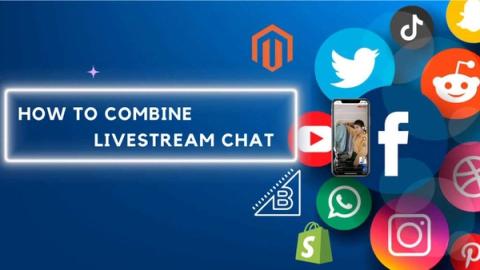
In today’s digital age, shoppable livestream platforms are revolutionizing the way brands engage with their audiences. Integrating a robust livestream e-commerce solution is essential for maximizing engagement and conversion rates. One of the most critical components of a successful livestream is the chat feature, which can turn passive viewers into active participants. Before we dive on how to combine the chat of Instagram, Facebook, Youtube and your ecommerce webstore for your next livestream shopping, let’s dive on how to leverage chat on your shoppable livestream platform.
The Importance of Chat During a shoppable livestream
Engaging with viewers in real-time through chat creates a dynamic and interactive experience. Here’s why chat is crucial during livestreams:
- Enhanced Engagement: Chat transforms passive viewers into active participants, fostering a lively and interactive atmosphere.
- Community Building: As viewers interact with each other and the host, a sense of community develops, allowing your audience to bond over a shared experience.
- Improved Conversion Rates: Studies have shown that live chat can lead to a 20% increase in conversion rates, making it a powerful tool for driving sales.
Authenticity Matters
It’s vital to create genuine, live content rather than pre-recorded videos. Authentic livestreams generate enthusiasm and excitement, which resonate with audiences and encourage real-time interactions.
Managing Chat During a Shoppable Livestream Show
Effective chat management is key to a successful livestream. Here are some best practices:
- Dedicated Chat Manager: Assign someone to manage the chat, allowing the host to focus on the presentation. This person can highlight interesting comments and questions for the host to address.
- Communication Between Host and Chat Manager: Establish a clear communication channel between the host and the chat manager to ensure that notable comments are brought to the host’s attention for a more interactive experience.
- Role of the Chat Manager: Ideally, the chat manager should be a community manager or a customer service representative who excels at fostering conversation and engagement.
Dos and Don’ts for Integrating Livestream Chat from All Platforms into One Place
Don’t:
- Avoid Prebuilt APIs that Scrape Chat Data: While there are many multi-livestream chat data scrapers available, using them can lead to several issues: Latency Problems: Merging chat data from various sources can result in significant delays, making your chat appear disorganized and difficult to follow. Detection by Platforms: Most social media platforms have algorithms to detect and combat bot activities. Using scrapers can lead to your social media handles being shut down as the platforms identify and act against bot usage. Dependence on Third-Party Developers: When you rely on a third-party developer’s API, you’re at the mercy of their maintenance and policy changes. They could impose new rules, such as high usage fees or limitations, disrupting your operations. Security Risks: Using unverified third-party tools can expose your data to security vulnerabilities and potential breaches.
Do:
- Build Direct Integrations with Official APIs: Invest the time and effort to develop integrations directly with each platform’s official API, such as Facebook’s Graph API. Though this approach requires more resources, it offers several advantages: Compliance with Platform Rules: By using official APIs, you ensure that your integrations comply with the platform’s policies, providing long-term stability and security. Better Protection: Platform reviews and approvals add an extra layer of security and legitimacy to your integrations, protecting your accounts from unexpected shutdowns. Reliable Performance: Official APIs offer more reliable performance with lower latency, ensuring a seamless and efficient chat experience for your audience. Scalability: Direct integrations are more scalable and adaptable to growing usage, without the risk of sudden changes in terms imposed by third-party developers.
- Leverage reliable software offering this functionality
Leveraging Software to Manage Multi-Channel Chat
When streaming across multiple channels, managing the community conversation can be challenging. Here are some tips:
- Choose the Right Tools: Using multiple phones for different channels can complicate chat management for the host. Instead, consider tools like Ecamm, Streamyard, or Restream, which offer advanced editing options but have limitations in merging chat streams.
- Utilize eStreamly: eStreamly allows you to create shoppable livestream on Facebook, YouTube, Instagram, and your website simultaneously. This platform combines all chat channels into one place, enabling seamless engagement with your audience across different platforms.
How to combine the chat of Instagram, Facebook, Youtube and your webstore with eStreamly, a Shoppable Livestream Platform.
1. Schedule your livestream show
Under your channel, go to “Upcoming Events” and select “Schedule an upcoming event”
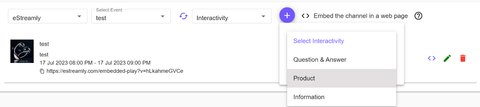
2. Add Product and interactivity
Select interactivity, click ➕ select the type of interactivity desired
3. Add your Facebook, Instagram, Youtube social media credentials on eStreamly Shoppable Livestream Platform
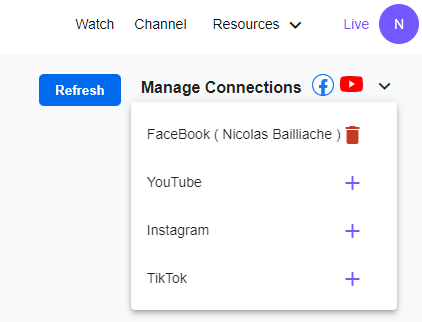
Select your room. You can add social media handle credentials by clicking “Manage Connections”
Click ➕ and add your Facebook, Instagram, Youtube credentials.
4. Go live
- Manage the combine livestream chat from the phone
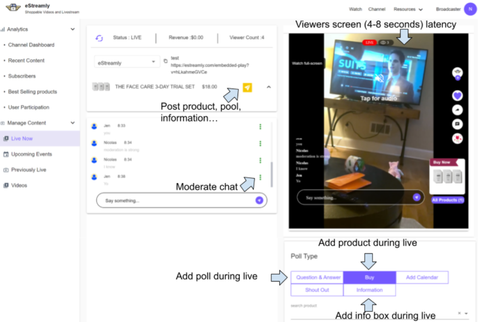
During your livestream initiated with the broadcaster, you can monitor the chat and add products & polls. Host will be able to view all chats from all social media connected accounts from Facebook, Instagram and Youtube directly from eStreamly shoppable livestream platform web browser app. The host will also be able to know the username of the viewer. He/she will know and from what platform they are engaging with you.
- Manage the combine livestream chat and shoppable livestream platform interactivity from the desktop
Chat Manager will be able to manage all livestream from the various social media connected account – Facebook, Instagram, YouTube and their ecommerce webstore video player from the desktop dashboard.
Conclusion
Incorporating a comprehensive livestream e-commerce solution with integrated chat features can significantly enhance the effectiveness of your shoppable livestream platform. By prioritizing real-time engagement and community building, brands can create authentic, interactive experiences that drive higher conversion rates and foster a loyal audience. Utilizing tools like eStreamly can streamline chat management across multiple channels, ensuring that your livestreams are both engaging and efficient.