 eStreamly
Chapter 01Before You Start: Heads Down, Strategy Up
Before diving into your livestream shopping on social media, it’s crucial to develop a well-thought-out strategy. Research shows that streamers who plan ahead see up to 70% higher engagement rates compared to those who don’t. Here’s a comprehensive guide to crafting an effective livestream shopping strategy. You can also check our liveshopping playbook
Best Preparation Includes
Define Your Goals
Establish clear, measurable objectives for your livestream shopping. According to a study by Livestream.com, 80% of audiences prefer live video from a brand to social posts. Whether you’re aiming to boost brand awareness, drive sales, or engage your community, having specific goals will guide your efforts and help measure success.
Define Your Audience Segment
Understanding your audience is critical. Use analytics tools to gather demographic data, interests, and behaviors. Platforms like Facebook Insights and YouTube Analytics can provide valuable information about your viewers’ preferences and peak activity times.
Define How & Where You Will Engage Your Audience
Identify the most effective platforms for reaching your target audience. For instance, Instagram Live has seen a 70% increase in usage since the start of 2020. Choose platforms that align with your audience’s preferences and offer features that complement your content.
Define Your 4Ps (Product, Placement, Pricing, Promotion)
Develop a clear marketing mix strategy. Where will you host your live (physical place and where on the web), What products will you present… Define the WIIFM (what’s in it for me): Why should a user care to join your stream, is it for a value deal, is it a special one of the time product reveal… Make sure you define clearly my incentive as a viewer. There is a great podcast on this topic if you want to explore. The live ecommerce podcast with Patti Reily
Define Your Promotion Calendar
Plan your promotional efforts strategically. Studies show that promoting a livestream at least a week in advance can increase viewership by up to 40%. Utilize a mix of countdowns, teaser posts, email reminders, and cross-promotion with influencers to maximize visibility.
Create Your Blueprint
Draft a detailed content flow, including key talking points and interactive segments. Streams with planned interactive elements see 24% higher engagement rates. Checkout this post to help with creating your blueprint
Chapter 02Short on Time to Define a Strategy?
Even a brief 15-20 minute planning session can significantly improve your chances of success. Use a liveshopping playbook checklist as a quick reference guide.
Key Factor: Preschedule Your Stream
Prescheduling your stream across platforms is crucial for building anticipation and increasing discoverability. Here are some best practices:
- Schedule Your Stream at Least 7 Days in Advance: Giving your audience a week’s notice can increase attendance rates by up to 30%.
- Create a Livestream Event on Each Platform. Utilize platform-specific tools to maximize visibility and audience registration:
Facebook: Scheduling a Livestream Event
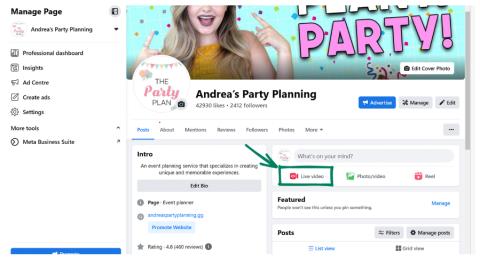
Create an event page to generate buzz and allow RSVPs. Facebook events can reach up to 10 times more people than standard posts. Navigate to “Live Video” under your page’s publishing tools, then click on “Schedule Live Video.” Add the details, including the time, description, and any related media.
Tap Live from your Feed, business Page, or profile or tap Live video right below the “What’s on your mind?” box.
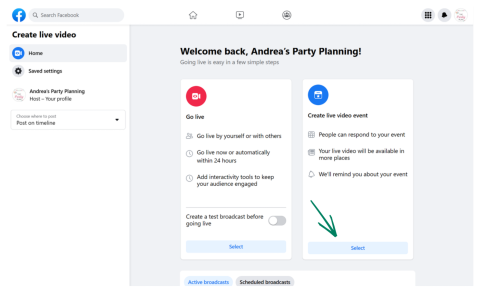
Tap Select in the Create live video event box.
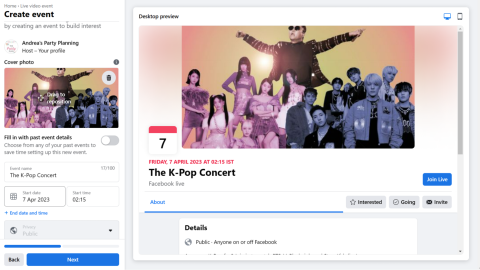
Set the live event name, cover photo, date, and time.
Instagram: Scheduling a Livestream Event
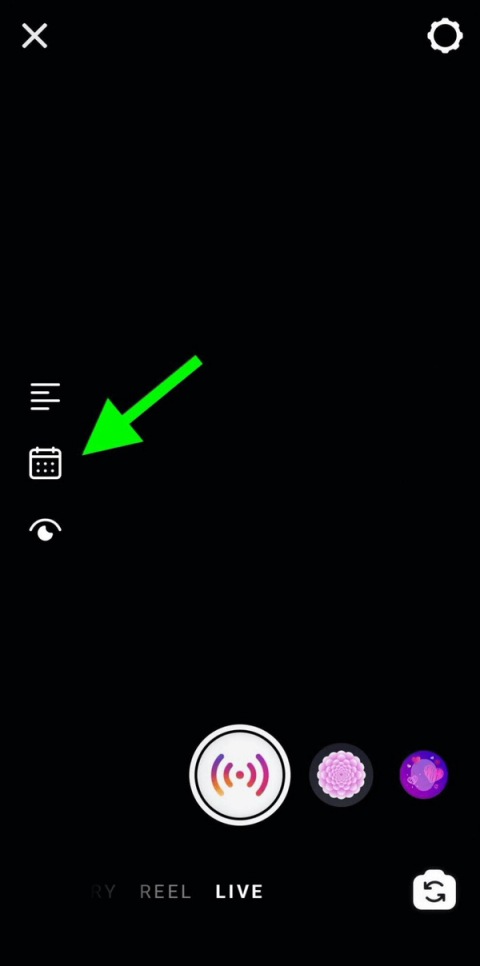
Use Instagram Live scheduling features. Instagram Live videos are watched 3x longer than regular videos. Open the app, swipe right to access the camera, and select “Live” From there, you can click the calendar icon to schedule the livestream on the left side of the screen. Here, you can enter all the details for your planned livestream.
First, give your livestream shopping a clear, descriptive title. While keeping it short is fine, more details help generate interest and give viewers a reason to tune in. Instagram reminders only show your account name, live title, and event time, so a descriptive title makes it easier for your audience to remember. If you’re hosting multiple events, detailed titles help both your team and audience differentiate between them.
After giving your liveshopping a title, set the start time. You can schedule it to start at any time from 1 hour to 3 months away. Keep in mind that the further out you plan, the more opportunities you’ll have to promote your livestream shopping.
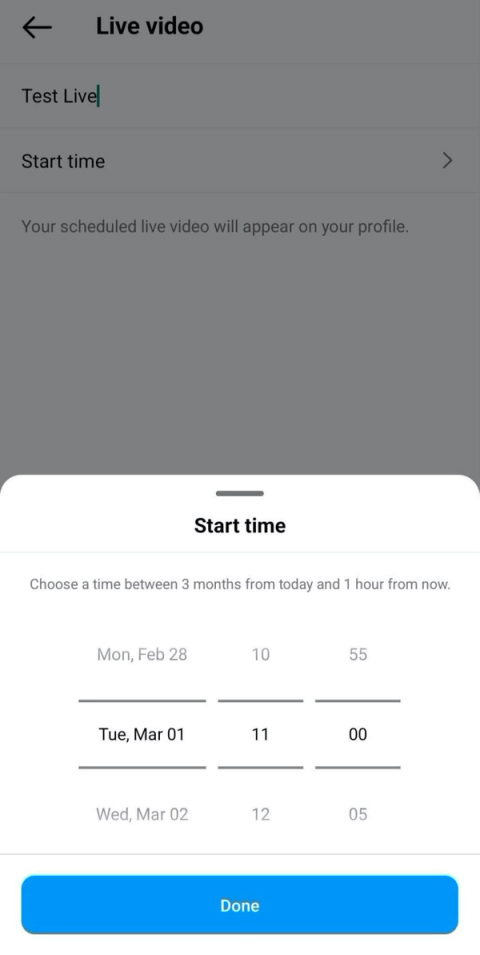
Review the details of your Instagram live. Then tap the blue Schedule Live Video button to complete the process.
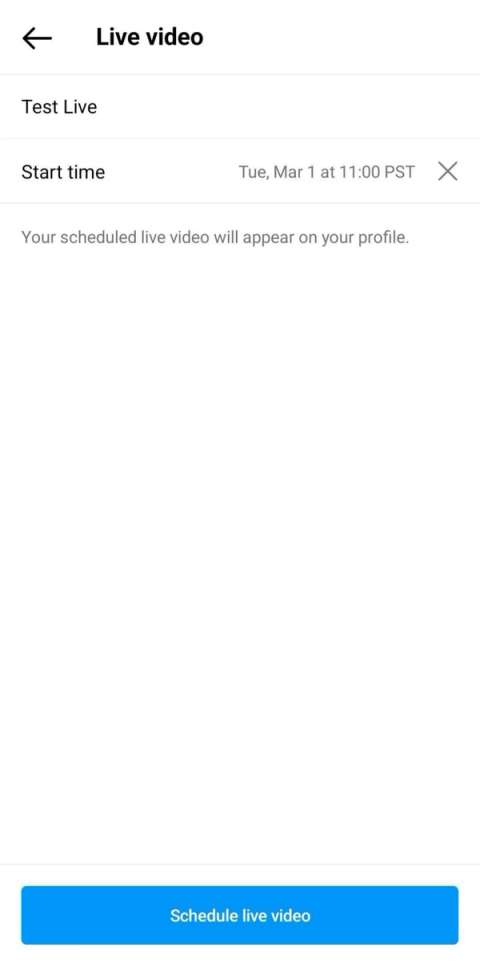
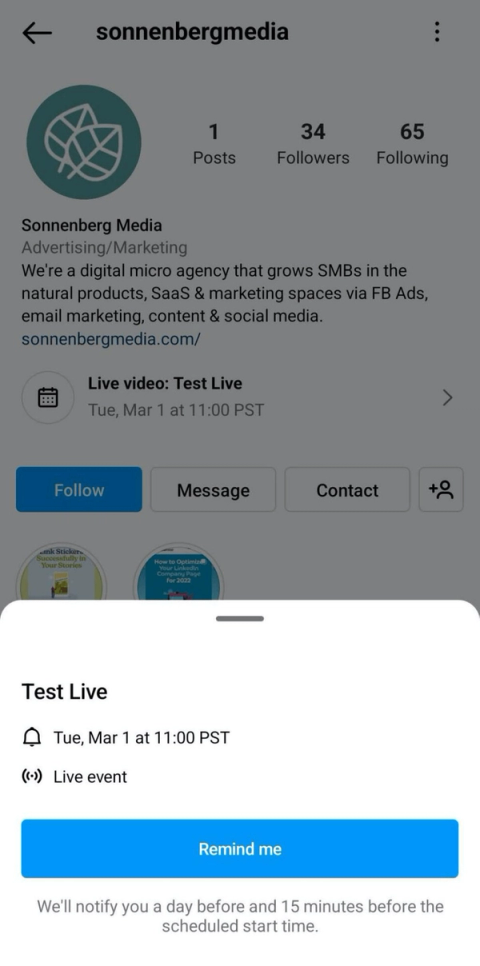
An interactive banner with a calendar icon will automatically appear on your profile right under your bio. Anyone visiting your profile can see the live title and time, and people can tap the banner to turn on event reminders.
YouTube: Scheduling a Livestream Event
Set up your stream details and upload a trailer. YouTube Live streams with trailers see a 40% increase in viewership. To schedule, go to the YouTube Studio, click “Create” and select “Go Live.” Set up your stream details—title, description, thumbnail—and then choose the date and time for the event. You can even upload a trailer to hype up the stream ahead of time. See below for further details
Press the blue Schedule Stream button located in the top right.
Press Create New button.
Fill out the information: stream title, visibility, description, tags, date, and time.
Upload a thumbnail and decide the audience. Press the Create Stream button.
Chapter 03Why Should I Preschedule the Stream on Social Media?
Prescheduling is crucial because live notifications typically reach only 3-10% of your most engaged followers. By prescheduling, you provide additional opportunities for audience awareness and registration. Prescheduled streams can increase viewership by up to 50% compared to impromptu live sessions.
By implementing these strategies and leveraging data-driven insights, you can significantly boost your livestream’s visibility and engagement, ultimately maximizing your social media viewership during your stream.
Chapter 04What is Live Shopping?
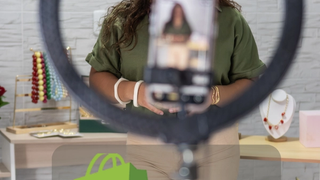
Liveshopping gives consumers the opportunity to purchase as they watch video streams. With social commerce, retailers can broadcast live video and engage with consumers in real time. eStreamly’s video commerce solution enables brands to host live shopping events across multiple channels. From shoppable live shows on social media to hosting video commerce events. Live shopping is the future of retail. Live streaming shopping apps, these are the tools successful retail brands will need. eStreamly’s white label solution gives brands shoppable videos.
As live streaming shopping gains momentum eStreamly is empowering retailers to leverage these Live streaming shopping apps and shoppable videos to drive higher conversion rates. Connect with today’s mobile first consumers.